SLATE
A tool that simplifies communication and scheduling for film producers and actors, making it easy to manage scheduling and rescheduling, so filming can begin without any hassle.
Visual Design
UX
Project Overview
Project Overview
Client: SLATE, film production startup
Team: Brian Yoo, Ryan Cho, Kaylee Cho, James Parrot, Oscar Shen
Timeline: 6 months (2025)
My Role: Product Designer, Team Lead
Client: SLATE, film production startup
Team: Brian Yoo, Ryan Cho, Kaylee Cho, James Parrot, Oscar Shen
Timeline: 6 months (2025)
My Role: Product Designer, Team Lead
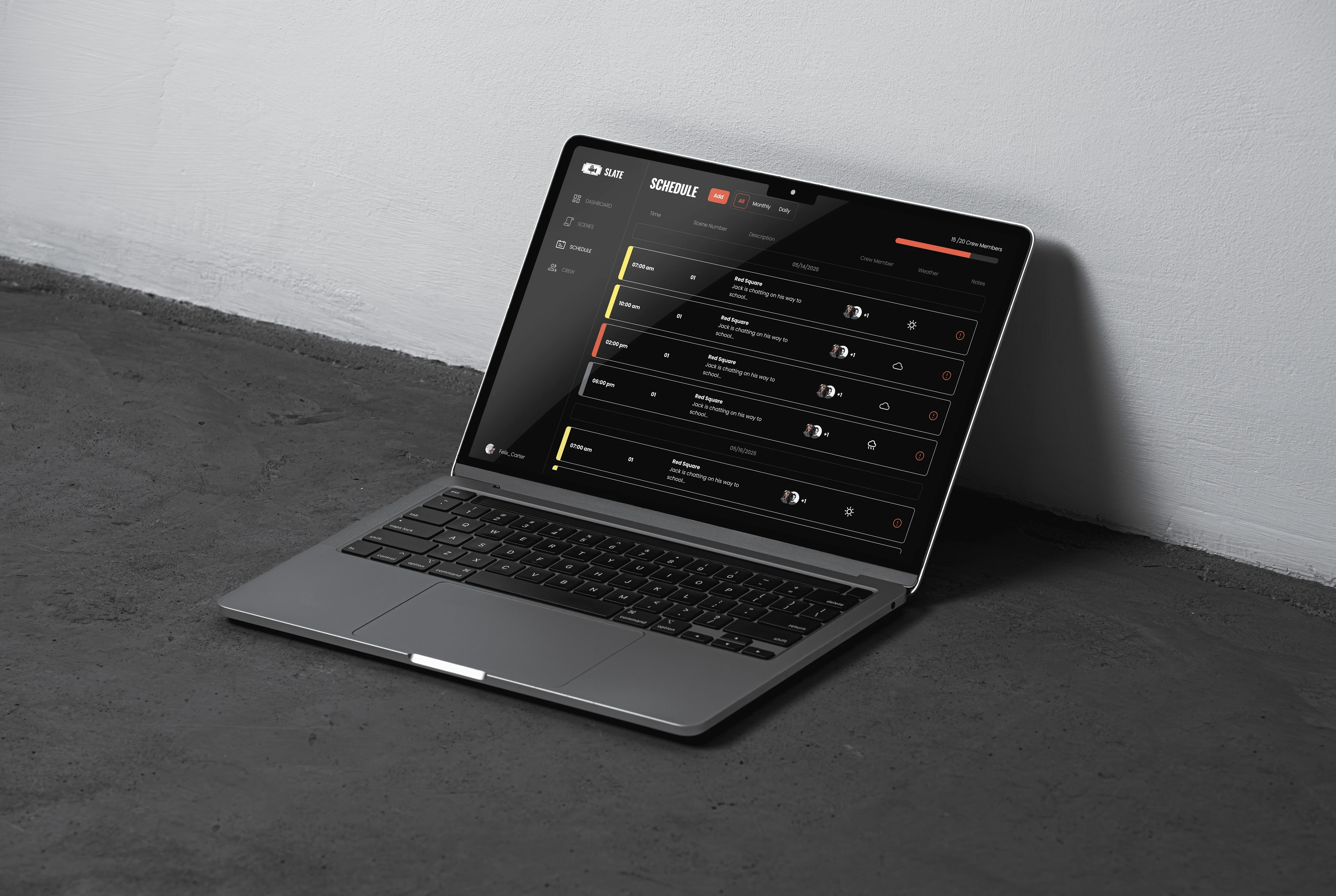
A streamlined scheduling tool that saves indie film producers 8-12 hours per short film production. I was a product designer/project manager for this project and worked alongside a client (SLATE founders), three developers, and another product designer.
A streamlined scheduling tool that saves indie film producers 8-12 hours per short film production. I was a product designer/project manager for this project and worked alongside a client (SLATE founders), three developers, and another product designer.
What is SLATE?
What is SLATE?
Slate is a sponsored project designed and developed by me and my team. Built specifically for indie filmmakers, it transforms the chaos of film production scheduling into something actually manageable.
Slate is a sponsored project designed and developed by me and my team. Built specifically for indie filmmakers, it transforms the chaos of film production scheduling into something actually manageable.
By combining script parsing, availability tracking, and automated schedule generation, SLATE gives small productions an affordable alternative to complex industry tools. This results in less time coordinating schedules and more time making films.
By combining script parsing, availability tracking, and automated schedule generation, SLATE gives small productions an affordable alternative to complex industry tools. This results in less time coordinating schedules and more time making films.
Problem: Scheduling Inefficiencies Cost Time and Money
Problem: Scheduling Inefficiencies Cost Time and Money
Film production scheduling consumes approximately 15-25% of the total production timeline, yet remains largely a manual process prone to delays. This inefficiency creates a cascading effect of increased costs and reduced productivity throughout the entire production cycle. We identified this critical bottleneck as an opportunity to streamline the filmmaking process and developed our solution to address these systemic challenges.
Film production scheduling consumes approximately 15-25% of the total production timeline, yet remains largely a manual process prone to delays. This inefficiency creates a cascading effect of increased costs and reduced productivity throughout the entire production cycle. We identified this critical bottleneck as an opportunity to streamline the filmmaking process and developed our solution to address these systemic challenges.
“
Sending out links for availability every time is annoying.
If someone could fill it out once and have it synced across
projects, that would be ideal.
“
Sending out links for availability every time is annoying. If someone could fill it out once and have it synced across projects, that would be ideal.
-Film Producer (10 Yrs Experience)
-Film Producer (10 Yrs Experience)
“
I often need to manually cross-reference schedules to prioritize essential personnel, which is time-consuming.
-Indie Filmmaker (3 Yrs Experience)
“
Trying to find a time where everyone can make it! I work with a
bare bones crew, so if one person drops, I can't have a shoot.
“
Trying to find a time where everyone can make it! I work with a
bare bones crew, so if one person drops, I can't have a shoot.
“
Everything goes through multiple tools—Sheets, Discord,
When2Meet—it’s hard to keep everything aligned.
“
Everything goes through multiple tools—Sheets, Discord,
When2Meet—it’s hard to keep everything aligned.
-Student Filmmaker (3 Yrs Experience)
-Student Filmmaker (3 Yrs Experience)
“
The more people involved, the harder it gets...
“
The more people involved, the harder it gets...
“
You often have to fill out availability forms for each group
separately. A centralized system would be great.
“
You often have to fill out availability forms for each group
separately. A centralized system would be great.
“
I often need to manually cross-reference schedules to prioritize essential personnel, which is time-consuming.
-Indie Filmmaker (3 Yrs Experience)
Solution: By creating a cross-functional tool that centralizes scheduling, availability tracking, and communication in one platform
Solution: By creating a cross-functional tool that centralizes scheduling, availability tracking, and communication in one platform
Final Product Features:
Final Product Features:
User Onboarding
User Onboarding
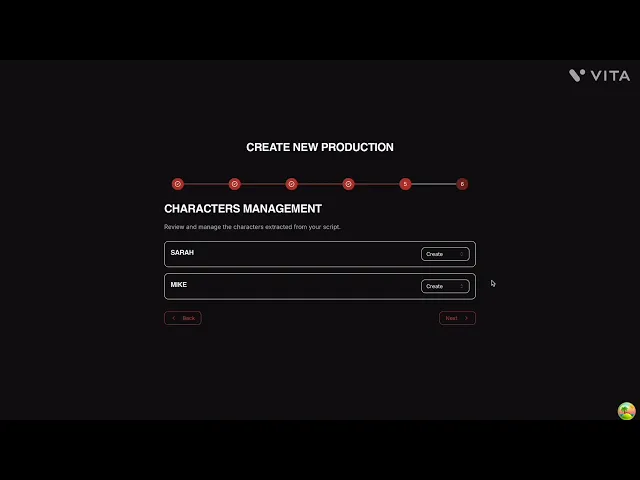
Upload your script, add production details and date ranges, and then invite cast and crew with their roles to set up your project.
Upload your script, add production details and date ranges, and then invite cast and crew with their roles to set up your project.

Script Parsing/Breakdown
Script Parsing/Breakdown
Upload your script, add production details and date ranges, and then invite cast and crew with their roles to set up your project.
Upload your script, add production details and date ranges, and then invite cast and crew with their roles to set up your project.
Actor Availability
Actor Availability
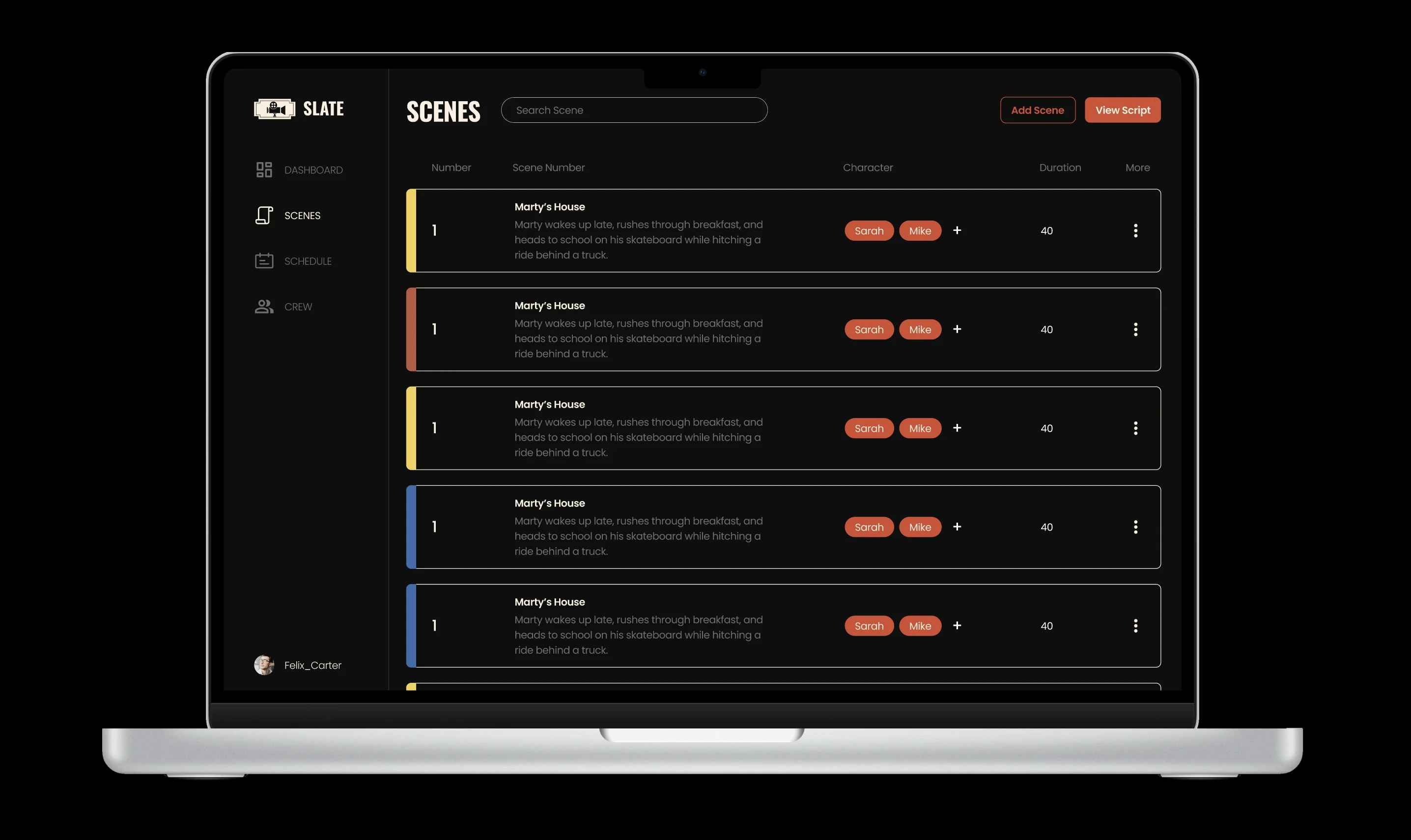
We created a centralized system where actors input their availability once, which automatically integrates with the scheduler to reduce manual coordination and prevent conflicts.
We created a centralized system where actors input their availability once, which automatically integrates with the scheduler to reduce manual coordination and prevent conflicts.

Upload your script, add production details and date ranges, and then invite cast and crew with their roles to set up your project.
Automated Scheduling
Automated Scheduling
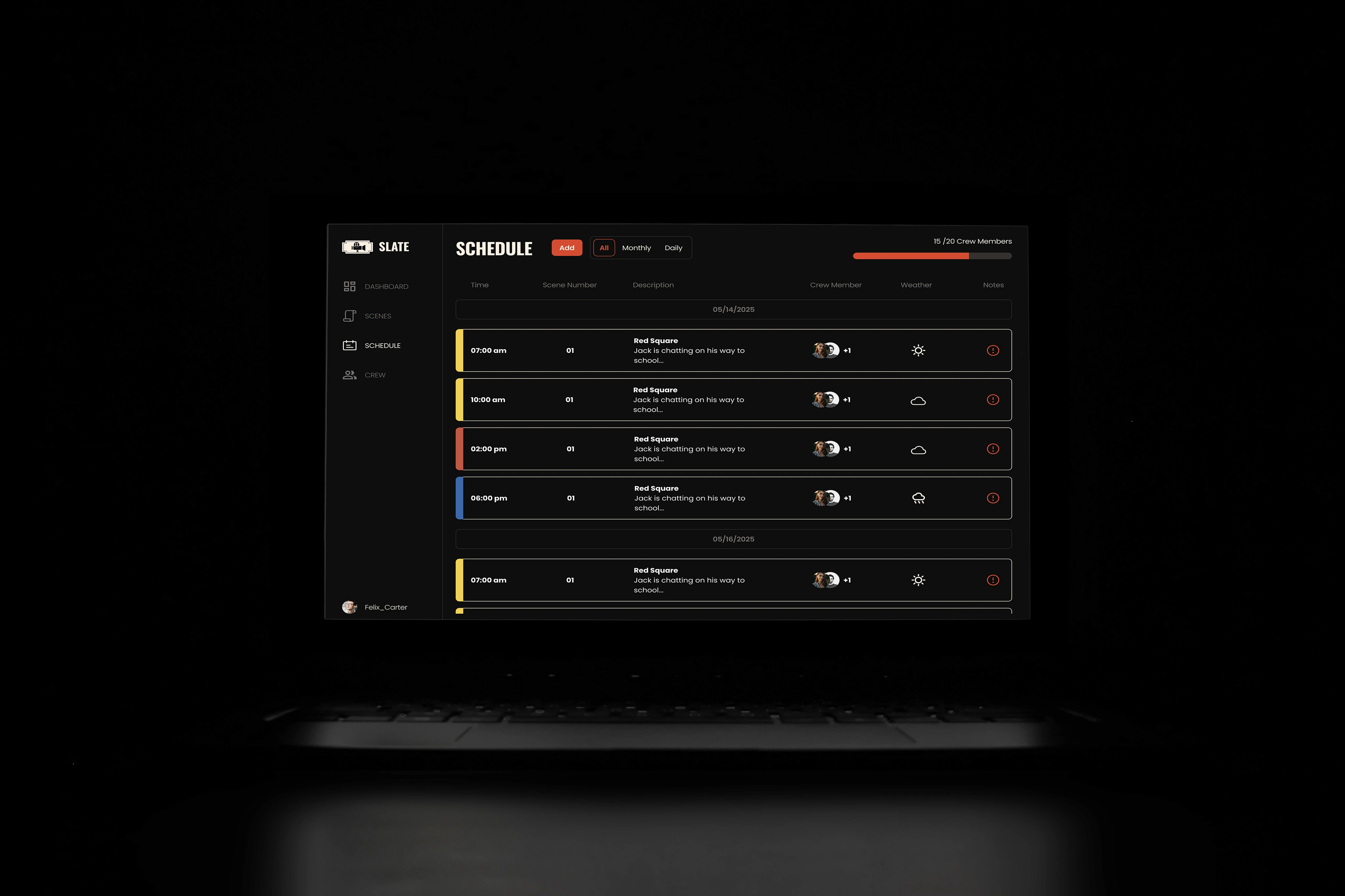
Our scheduling system provides a clear calendar interface where users can track availability, make real-time updates, and view schedules by day, week, or month. It also includes weather forecasts to help prevent delays.
Our scheduling system provides a clear calendar interface where users can track availability, make real-time updates, and view schedules by day, week, or month. It also includes weather forecasts to help prevent delays.

Upload your script, add production details and date ranges, and then invite cast and crew with their roles to set up your project.
How Might We Help Indie Filmmakers Save Time, Cut Costs, and Schedule Effectively with Their Crew?
Research
Research
By conducting interviews, surveys, and competitive analysis with film producers and crew members, we gained insights into their scheduling workflows and pain points. We also spoke with actors as a secondary audience to understand their availability challenges. These interviews informed us about users' production experience, coordination habits, current scheduling methods, and communication preferences.
By conducting interviews, surveys, and competitive analysis with film producers and crew members, we gained insights into their scheduling workflows and pain points. We also spoke with actors as a secondary audience to understand their availability challenges. These interviews informed us about users' production experience, coordination habits, current scheduling methods, and communication preferences.
Gathered insights from over 30 filmmakers and student directors to identify common scheduling pain points, tool preferences, and workflow inefficiencies.
Gathered insights from over 30 filmmakers and student directors to identify common scheduling pain points, tool preferences, and workflow inefficiencies.
Survey
Competitive Analysis
Reviewed 6 different existing platforms like Celtx and StudioBinder to assess their usability and applicability for low-budget and student film productions.
Interviews
Spoke with Lux (A UW filmmakers Club) filmmakers and 3 industry professionals to identify coordination workflows and production pain points.
How Might We Help Indie Filmmakers Save Time, Cut Costs, and Schedule Effectively with Their Crew?
SLATE
A tool that simplifies communication and scheduling for film producers and actors, making it easy to manage scheduling and rescheduling, so filming can begin without any hassle.
Visual Design
UX
SLATE
A tool that simplifies communication and scheduling for film producers and actors, making it easy to manage scheduling and rescheduling, so filming can begin without any hassle.
Visual Design
UX
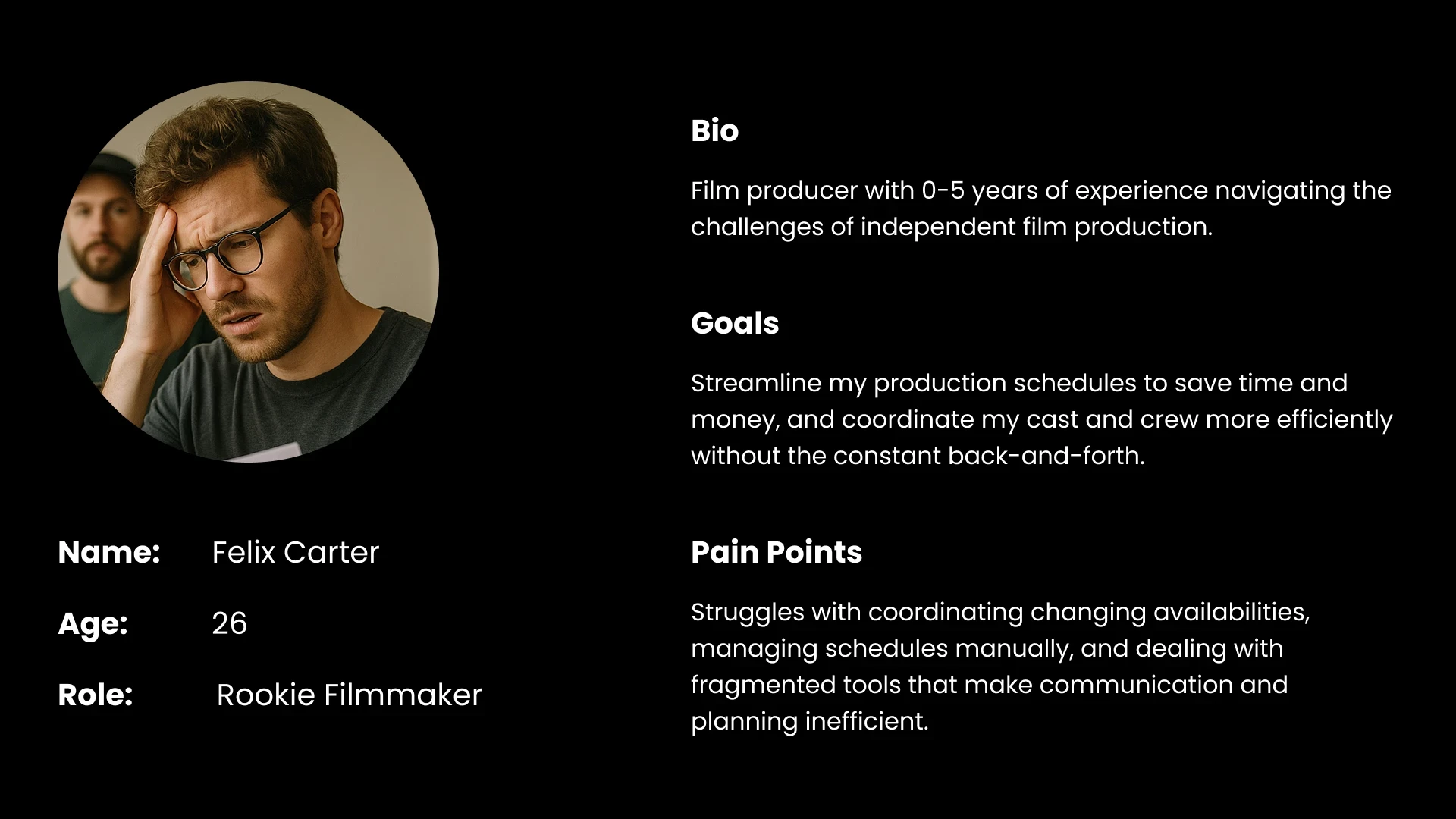
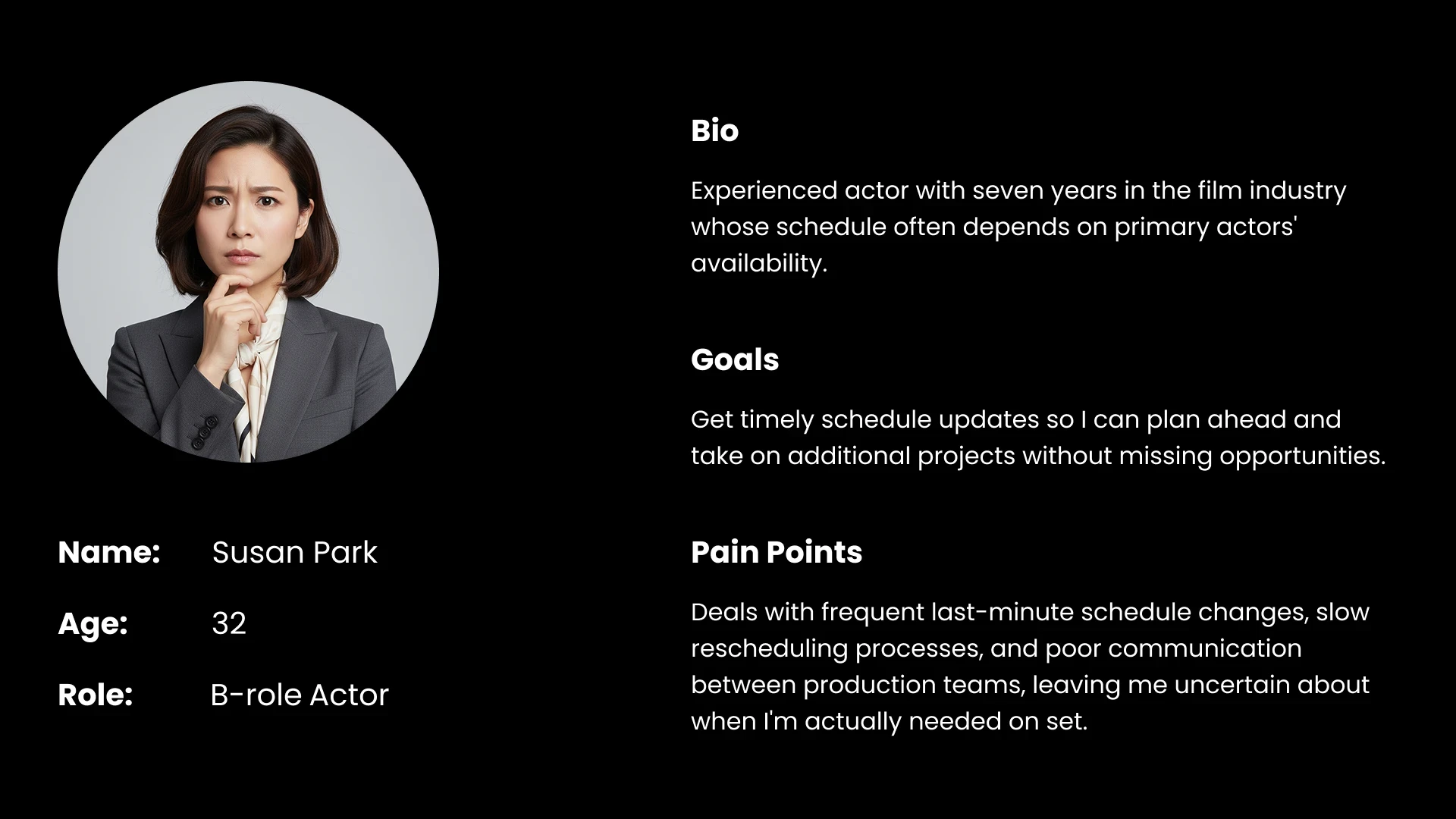
User Personas
User Personas
Traditional Scheduling Flow
Traditional Scheduling Flow
Our scheduling system provides a clear calendar interface where users can track availability, make real-time updates, and view schedules by day, week, or month. It also includes weather forecasts to help prevent delays.
Our scheduling system provides a clear calendar interface where users can track availability, make real-time updates, and view schedules by day, week, or month. It also includes weather forecasts to help prevent delays.
Manual script breakdown and scene analysis
Collect cast and crew availability through external tools (e.g. When2Meet, Google Sheet)
Cross-reference availability manually across all participants
Draft initial shooting schedule
Schedule scenes one at a time based on availability overlaps
Adjust schedule based on conflicts or last-minute changes
2
3
4
5
6
1
Manual script breakdown and scene analysis
1
Collect cast and crew availability through external tools (e.g. When2Meet, Google Sheet)
2
Cross-reference availability manually across all participants
3
Draft initial shooting schedule
4
Schedule scenes one at a time based on availability overlaps
6
Adjust schedule based on conflicts or last-minute changes
5
Main Insights
Manual Scheduling Challenges
Unrefined Scheduling Systems
Overcomplicated Tools
Constant rescheduling from availability conflicts, weather, and other issues makes manual scheduling frustrating and takes too much time.
Using multiple platforms (Slack, When2meet, Google Calendar) creates a fragmented and unreliable system.
Existing tools like Yamdu and StudioBinder are designed for large-scale productions, making them too costly and complex for small filmmakers
MVP Design Workflow
MVP Design Workflow
We mapped out our system to understand how it differs from existing tools and how users would navigate it. To fix manual scheduling issues, we designed an automated system using script parsing, onboarding, and dynamic calendars. We created early wireframes to test the concept and get feedback before building the final prototype.
We mapped out our system to understand how it differs from existing tools and how users would navigate it. To fix manual scheduling issues, we designed an automated system using script parsing, onboarding, and dynamic calendars. We created early wireframes to test the concept and get feedback before building the final prototype.
Script Info Needed
Script Info Needed
Quick Schedule Overview
Quick Schedule Overview
Onboarding
Onboarding
Script Parser
Script Parser
Automatic Scheduing
Automatic Scheduing
Calendar View
Calendar View
Manual Scheduling Wastes Time and Effort
Manual Scheduling Wastes Time and Effort
Requires Production Details
Requires Production Details
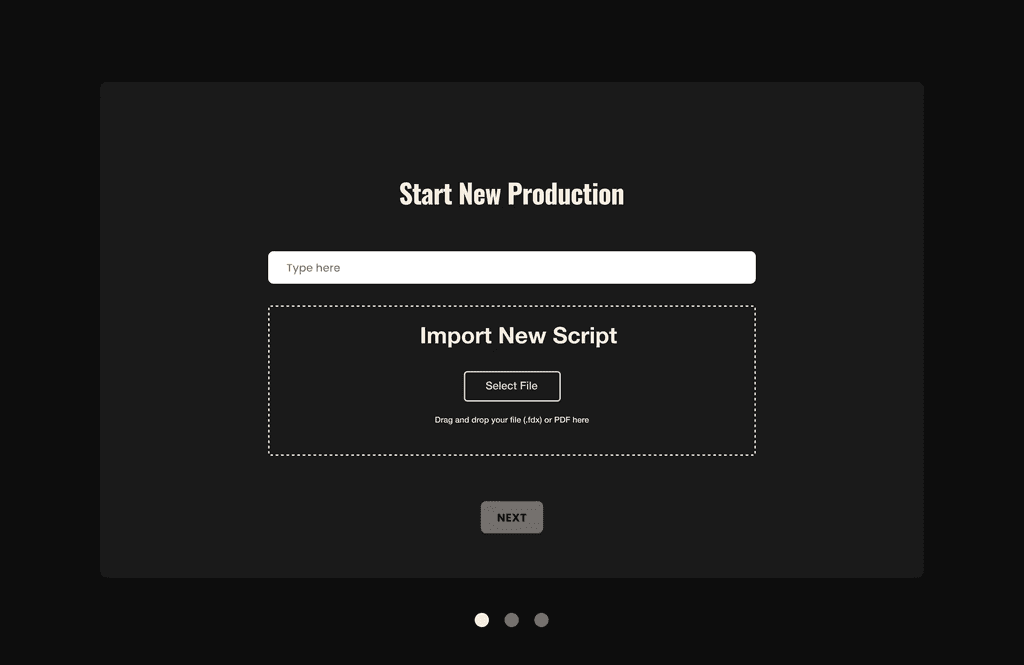
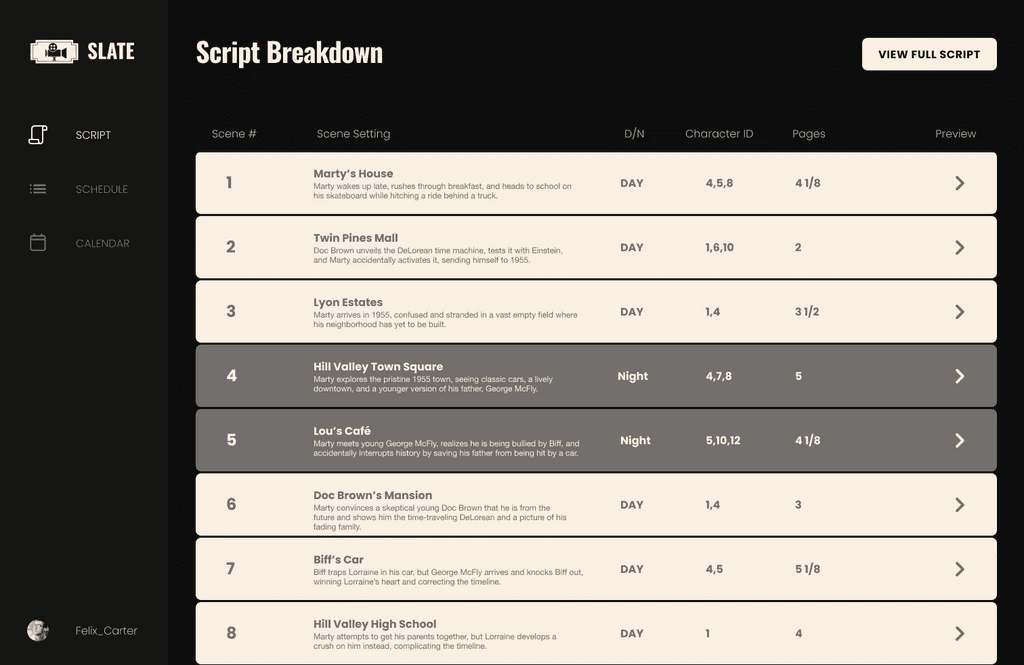
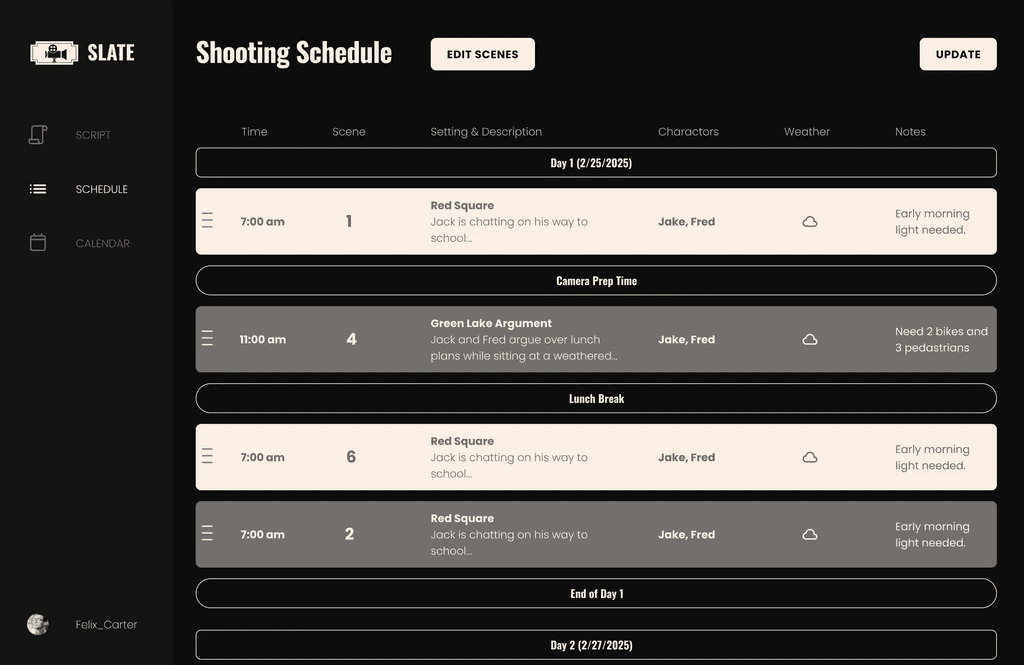
Testing and Insights
Based on user testing of our first MVP, participants liked the core scheduling flow (especially the script parser and calendar) but pointed out problems with navigation, visual clarity, and inflexible onboarding. Users wanted a more intuitive interface and better control during setup.
Based on user testing of our first MVP, participants liked the core scheduling flow (especially the script parser and calendar) but pointed out problems with navigation, visual clarity, and inflexible onboarding. Users wanted a more intuitive interface and better control during setup.
“
Trying to figure out what to click was the hardest part
“
Trying to figure out what to click was the hardest part
-User tester
-User tester 1
“
Trying to figure out what to click was the hardest part
Why can’t I change anything after onboarding? The crew always changes.
This would save me so much time compared to how I normally schedule.
“
Trying to figure out what to click was the hardest part
Why can’t I change anything after onboarding? The crew always changes.
This would save me so much time compared to how I normally schedule.
“
If I make a mistake, I have to start over... that’s frustrating.
“
If I make a mistake, I have to start over... that’s frustrating.
“
I had to start over just to fix one typo or one error in the script.
“
I had to start over just to fix one typo or one error in the script.
“
This would save me so much time compared to how I normally schedule.
“
This would save me so much time compared to how I normally schedule.
-User tester (Indie Filmmaker)
-User tester (Indie Filmmaker)
“
Why can’t I change anything after onboarding? The crew always changes.
“
Why can’t I change anything after onboarding? The crew always changes.
-User tester (Student Filmmaker)
-User tester (Student Filmmaker)
Improvement 1: Intuitive Style & Color
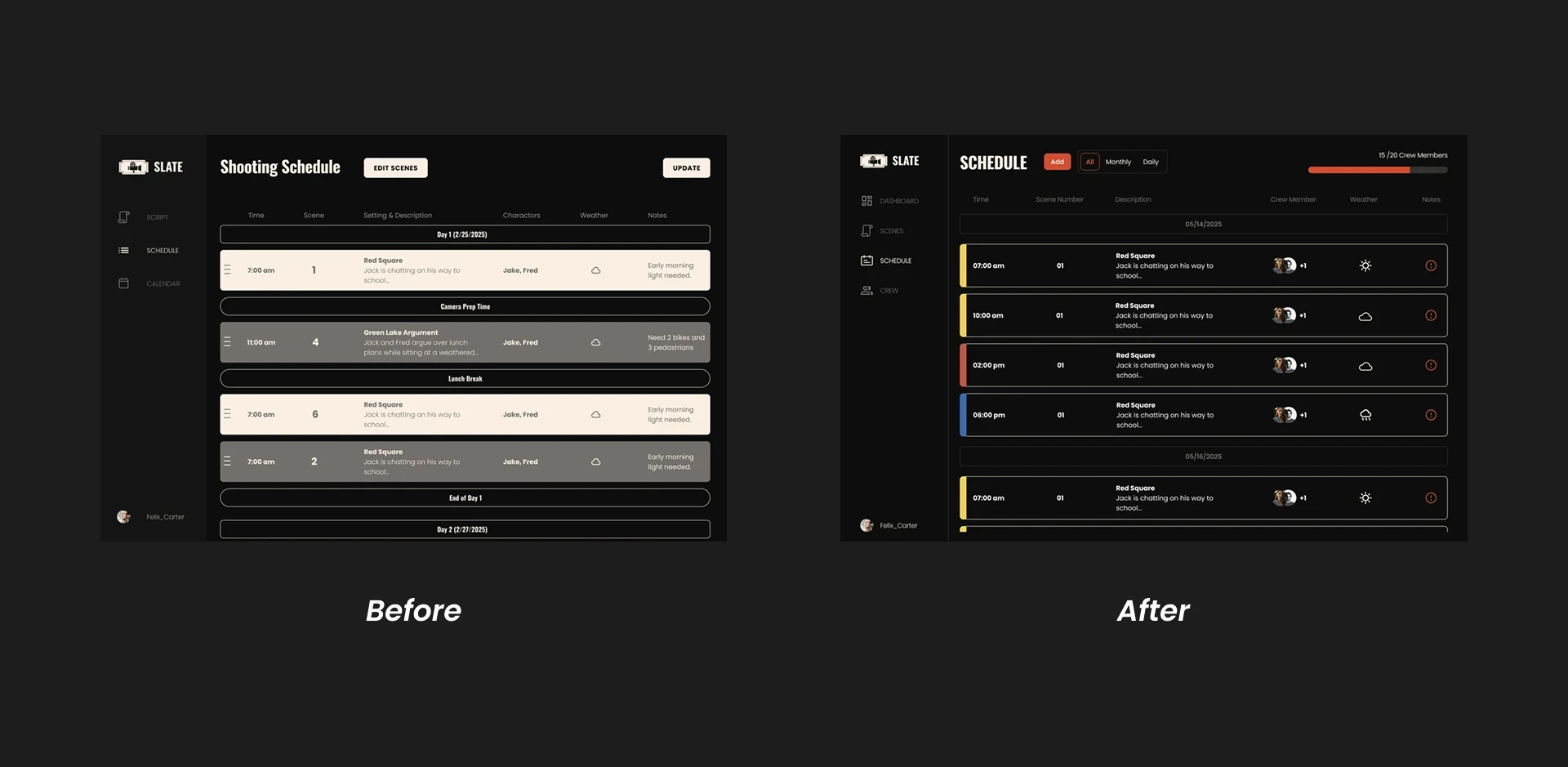
Before: Confusing day/night color scheme with poor element distinction due to monochromatic palette.
After: Added accent colors for key interactions and industry-standard day/night coding for improved clarity.
Before: Confusing day/night color scheme with poor element distinction due to monochromatic palette.
After: Added accent colors for key interactions and industry-standard day/night coding for improved clarity.
Improvement 2: Crew Management Features
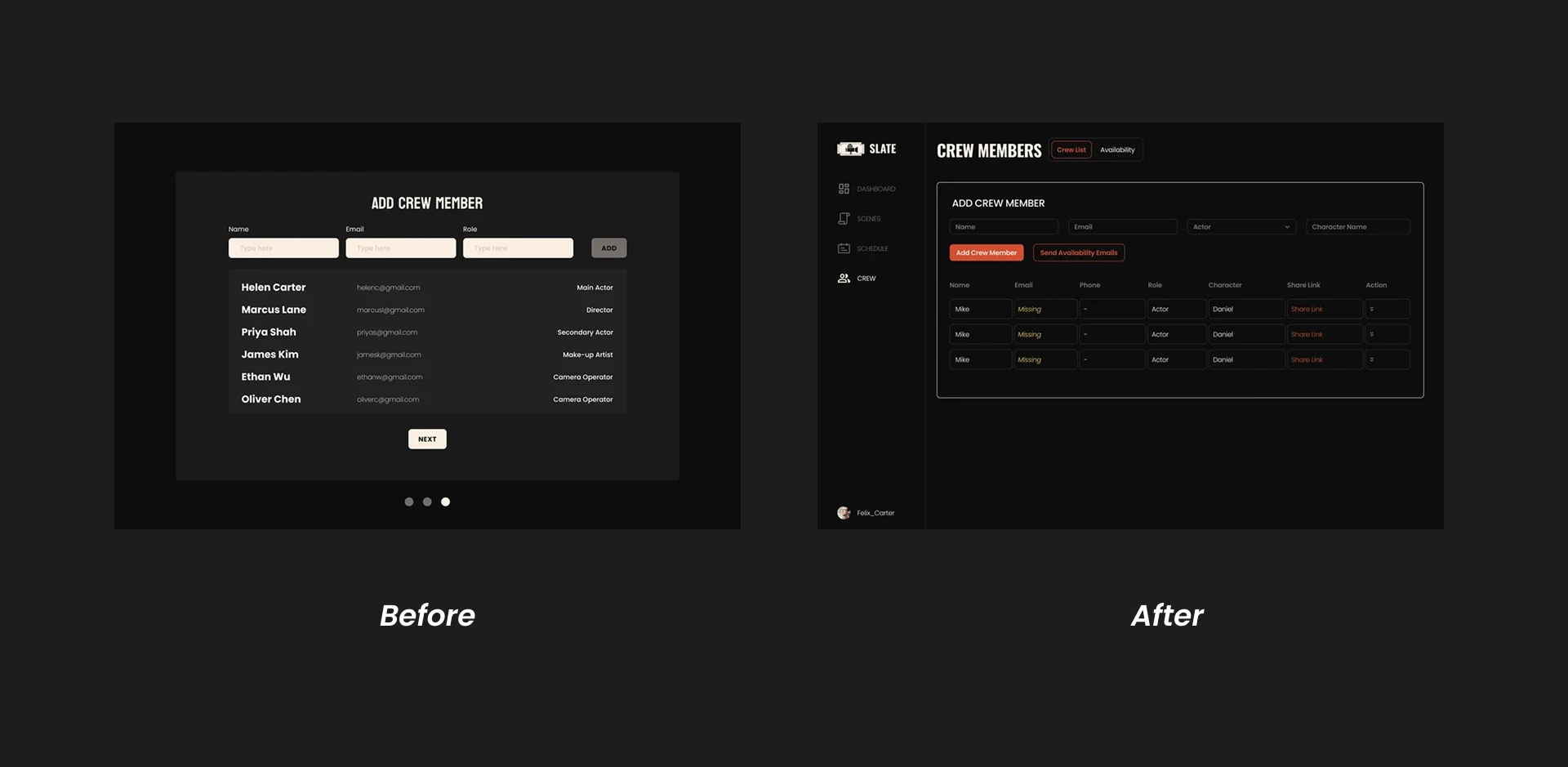
Before: Limited crew management post-setup despite user need for ongoing role, availability, and contact updates.
After: Created a dedicated Crew Management Page with editable fields and persistent crew detail access.
Before: Limited crew management post-setup despite user need for ongoing role, availability, and contact updates.
After: Created a dedicated Crew Management Page with editable fields and persistent crew detail access.
Improvement 3: Fix Rigid Onboarding Experience
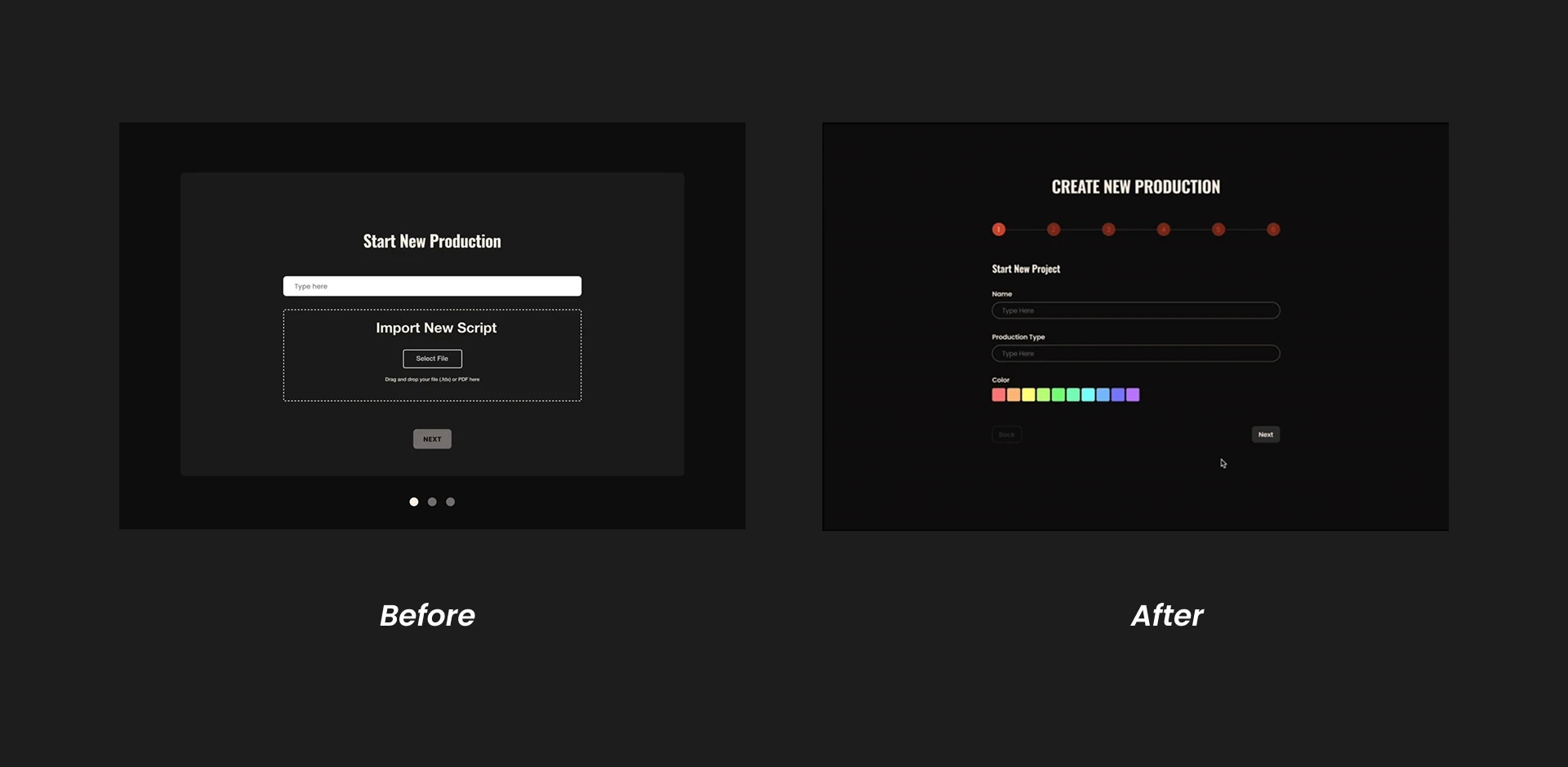
Before: A rigid onboarding process without mid-flow editing capability caused workflow disruption and user frustration.
After: Redesigned with live edits, autosaving, and modular input to allow adjustments without restarting.
Before: A rigid onboarding process without mid-flow editing capability caused workflow disruption and user frustration.
After: Redesigned with live edits, autosaving, and modular input to allow adjustments without restarting.
Information Architecture
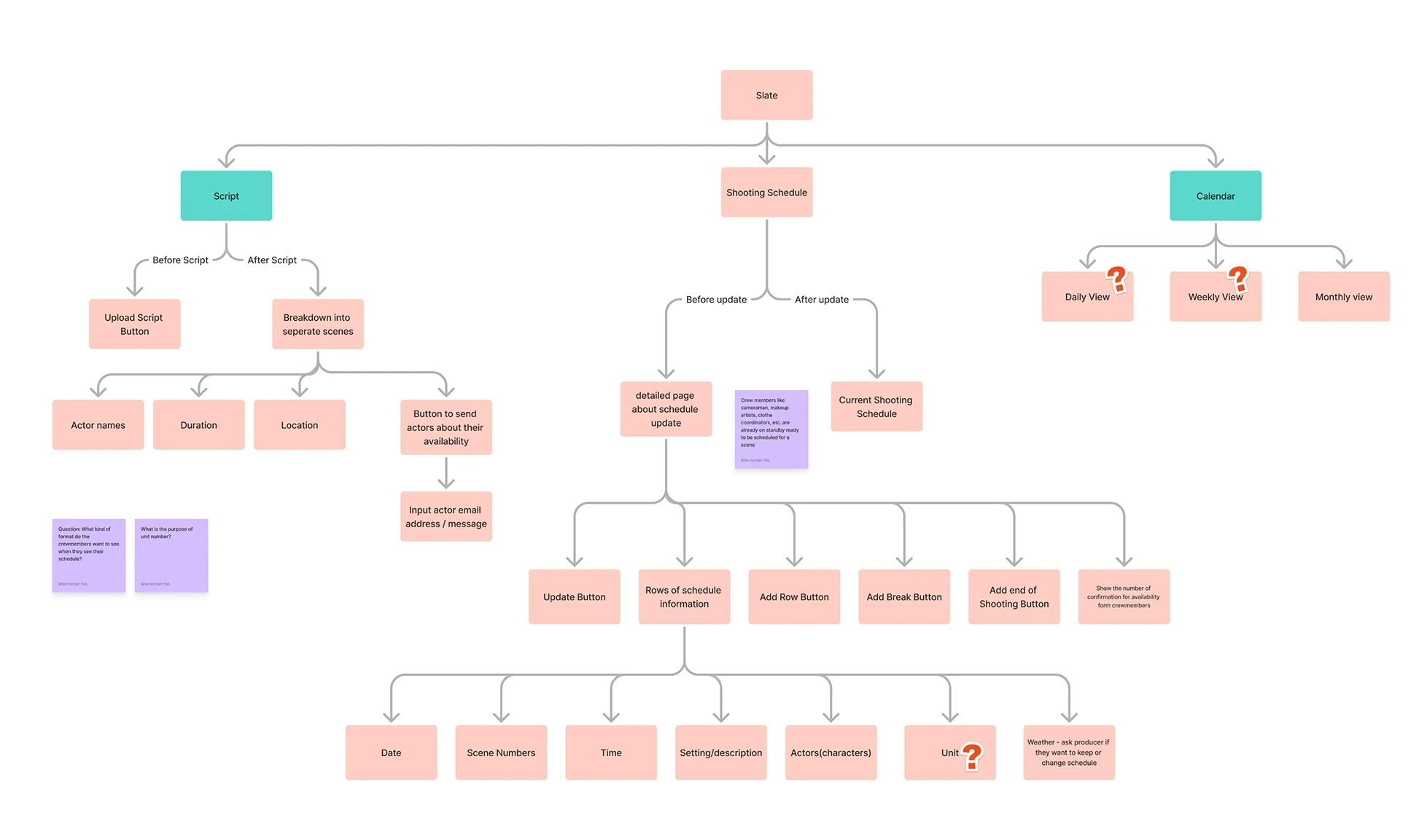
Mapping our information architecture helped us identify what makes SLATE unique compared to existing scheduling tools while clarifying how different features connect. This flow also showed us how users would move through the system, from initial setup to final scheduling.
Mapping our information architecture helped us identify what makes SLATE unique compared to existing scheduling tools while clarifying how different features connect. This flow also showed us how users would move through the system, from initial setup to final scheduling.
Design System
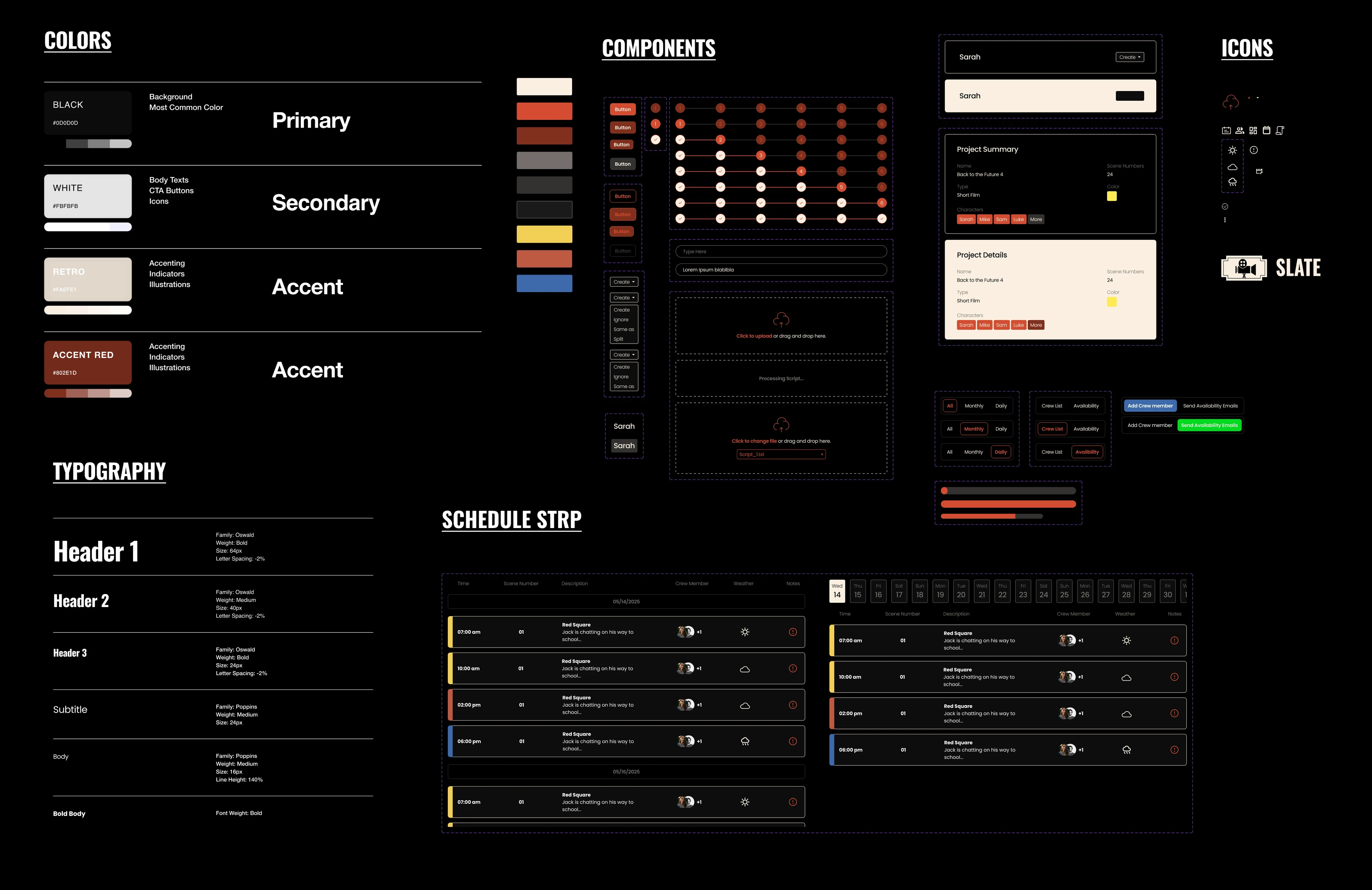
We created a shared style and component library in Figma to maintain visual consistency and speed up development. The design system ensures cohesive, memorable user experiences while remaining flexible for future iterations. I also provided interactive prototypes with clear specs covering spacing, states, and behaviors to ensure smooth handoff between design and engineering.
We created a shared style and component library in Figma to maintain visual consistency and speed up development. The design system ensures cohesive, memorable user experiences while remaining flexible for future iterations. I also provided interactive prototypes with clear specs covering spacing, states, and behaviors to ensure smooth handoff between design and engineering.
Reflection
This project taught me how to present design decisions clearly, incorporate feedback effectively, and balance user needs with business goals. Working with developers helped me write better specs and consider technical constraints in my designs.
As one of my first complete UX projects, I learned the value of rapid prototyping through sketches and paper mockups before moving digital. Creating a design system early on streamlined iterations and maintained consistency throughout the process.
SLATE gave me hands-on experience with cross-functional collaboration and strengthened my confidence as a product designer.
What's next for SLATE?
Future iterations would include enhanced weather integration for outdoor shoots, expanded script parser compatibility, and mobile optimization for on-set use. I'd also like to integrate an AI assistant to help users navigate SLATE easily and add analytics showing time and cost savings.
I plan to continue developing SLATE with the client to create a standardized scheduling tool for filmmakers. The goal is to save time and simplify the production process, and I'm excited to see SLATE become an essential part of every filmmaker's toolkit.
Reflection
This project taught me how to present design decisions clearly, incorporate feedback effectively, and balance user needs with business goals. Working with developers helped me write better specs and consider technical constraints in my designs.
As one of my first complete UX projects, I learned the value of rapid prototyping through sketches and paper mockups before moving digital. Creating a design system early on streamlined iterations and maintained consistency throughout the process.
SLATE gave me hands-on experience with cross-functional collaboration and strengthened my confidence as a product designer.
What's next for SLATE?
Future iterations would include enhanced weather integration for outdoor shoots, expanded script parser compatibility, and mobile optimization for on-set use. I'd also like to integrate an AI assistant to help users navigate SLATE easily and add analytics showing time and cost savings.
I plan to continue developing SLATE with the client to create a standardized scheduling tool for filmmakers. The goal is to save time and simplify the production process, and I'm excited to see SLATE become an essential part of every filmmaker's toolkit.
Main Insights
Manual Scheduling Challenges
Unrefined Scheduling Systems
Overcomplicated Tools
Constant rescheduling from availability conflicts, weather, and other issues makes manual scheduling frustrating and takes too much time.
Using multiple platforms (Slack, When2meet, Google Calendar) creates a fragmented and unreliable system.
Existing tools like Yamdu and StudioBinder are designed for large-scale productions, making them too costly and complex for small filmmakers
Manual Scheduling Challenges
Unrefined Scheduling Systems
Overcomplicated Tools
Constant rescheduling from availability conflicts, weather, and other issues makes manual scheduling frustrating and takes too much time.
Using multiple platforms (Slack, When2meet, Google Calendar) creates a fragmented and unreliable system.
Existing tools like Yamdu and StudioBinder are designed for large-scale productions, making them too costly and complex for small filmmakers
Main Insights